
Login to your account!
Join the World's Largest Web App Marketplace!
Great to see you here!
Let’s set up your account in just a couple of steps.
Forgot password?
Enter your username or email to reset your account.
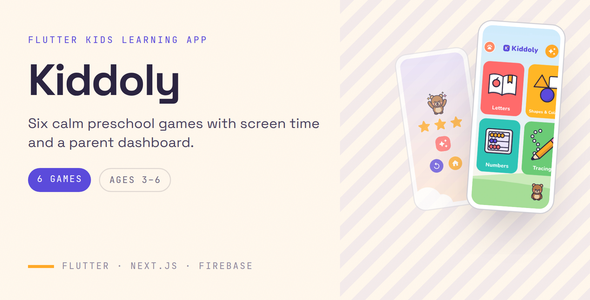
A kids learning app built for Google Play Families and the App Store Kids Category: six preschool games, ads off by default and a real parent dashboard.
Kiddoly is a complete, publishable preschool app for Android and iOS, written in Flutter, with a Next.js parent dashboard and a Firebase backend. It is made for studios and founders who want to ship a kids app and are worried about rejection or suspension under the families and kids policies. Monetization is wired the way those policies expect, and every design choice is documented, so you can answer a reviewer’s questions.
Try the demo
- Parent dashboard: kiddoly.devsnack.dev
- Dashboard login: email
[email protected], passwordkiddoly-demo(a free-plan parent with one child, Maya, and a week of play) - Android app: Download the demo APK
- App login: none needed, because the app has no accounts. Choose “Skip, use offline” and add a child.
- Grown-up area in the app: hold the Kiddoly logo for 2 seconds, then answer the sum
The demo login is shared by everyone, so you may see settings other visitors changed. Please don’t enter personal information.
Why Kiddoly
- ️ Ads that fit child-directed policy. Off by default. When you turn them on: banners only, only in the grown-up area behind the parental gate, flagged for child-directed treatment, rated G and non-personalized. The child’s play never shows an ad.
- A real parent dashboard. Progress per child, a skills heatmap, a plain-English “what to work on next”, screen time and bedtime, device pairing, JSON data export and account deletion.
- A child schema that collects almost nothing. An optional first name, a birth year and a preset avatar. No surname, full date of birth, email, photo, location or advertising ID.
- Server-verified purchases. One non-consumable, Kiddoly Pro, checked in a Firebase Callable Function with the Google Play Developer API or Apple’s signed transaction. The device never decides it owns Pro.
- ✈️ Fully offline play. No login and no account needed. Pairing with a parent is optional, and progress syncs when a paired device is online.
- Content in JSON. Add or change learning content in a text editor, then run the bundled validator.
The six games
- Letters: hear the letter, tap the picture. Optional lowercase mode.
- Numbers: count objects, tap to count, missing numbers, adding and subtracting to 10
- Shapes & Colours: match the shape, find a colour, spot the odd one out
- ✏️ Tracing: A–Z and 0–9, scored generously by waypoints with haptic ticks, and tunable
- Memory Match: five board sizes, with no timer and no move limit
- ❓ Quiz: an adaptive review of what the child has already played
Every game has 5 levels. Stars come from first-try accuracy and unlock 20 cosmetic stickers, never content. There are no streaks, lives or timers.
Child app features
- Parental gate: a sum written in words, with a 30-second lockout after 3 wrong answers that survives closing the app
- Guards the grown-up area, purchases, pairing, and child and screen-time settings
- Daily play-time limit, bedtime and “15 more minutes today”, enforced offline; the time’s-up screen can’t be dismissed by a child
- Up to 4 child profiles with Pro, each with their own buddy character
- On-device text-to-speech (no voice files), sound effects, 64 dp minimum tap targets
- Original artwork: 26 item pictures, 8 characters in 4 poses, 5 backgrounds, 20 stickers, with editable SVG sources
- Network is the only permission; SDK-added ad and background permissions are removed on Android
- Children’s data excluded from Android cloud backup
- An “update required” screen you control remotely
Parent dashboard features
- Sign in with email and password, Google, or an email link
- Minutes today against each child’s limit, and a 7-day chart by game
- Skills heatmap, level stars, 30-day activity and “what to work on next” per child
- Screen time, bedtime and game switches per child
- 6-character pairing codes, paired devices and revocation
- Plan status, time zone, the ads switch, JSON data export and delete account
Backend
- Firestore security rules confining each device to its own family, with an emulator test suite
- Callable Functions for pairing, revocation and purchase verification, with rate limiting on code redemption
- A deterministic demo-data seeder that refuses to touch a real project unless told to
Tech stack
- Flutter 3.47.2, Dart 3.13.2, Riverpod, drift (SQLite), go_router, freezed
- google_mobile_ads, in_app_purchase, flutter_tts, audioplayers, flutter_animate
- Next.js 16 (App Router), React 19, TypeScript, Tailwind CSS v4, shadcn/ui, Recharts
- Firebase Authentication, Cloud Firestore, Cloud Functions (2nd gen, Node.js 22, TypeScript)
- GitHub Actions CI for the app, the Firebase code and the dashboard
What’s included
- Full source of the Android and iOS app
- Full source of the parent dashboard
- Firebase rules, rules tests, Callable Functions and the demo seeder
- 7 content packs with 141 items, plus tracing strokes for 36 characters
- All artwork, editable SVG sources, sound effects and the bundled Nunito font
- Unit, widget, migration and architecture tests
- Offline HTML documentation and a quick start guide, including a Google Play Data safety example and App Store Kids Category notes
- A licence manifest for every bundled asset
- 6 months of item support
Third-party costs: please read
Kiddoly is source code, not a hosted service. Your purchase includes no hosting, no Firebase project, no developer or store accounts and no credit with any provider. Each service below is run by a third party and billed to you by that third party, under pricing we don’t set or control and that can change. Please check each provider’s current pricing yourself. Figures below are indicative and were correct at the time of writing.
Required to publish the full product:
- Firebase Blaze (pay-as-you-go) plan, billed by Google: needed to deploy the Callable Functions that pairing and purchase verification use. It includes a no-cost allowance; usage above it is charged.
- Hosting for the parent dashboard (Vercel, Netlify or any Node.js server), billed by your host. Some free tiers don’t allow commercial use.
- Apple Developer Program, billed by Apple (around US$99 a year at the time of writing)
- Google Play Console, billed by Google (a one-time fee of around US$25 at the time of writing)
Charged on every sale: Google Play and the App Store keep a commission on each Kiddoly Pro purchase, commonly 15% for small-business programmes and up to 30% otherwise.
Optional: Google AdMob (free to use; it pays you), and a domain name for the dashboard. Without Firebase, the app still plays fully offline, but there’s no pairing, no dashboard data, and Pro can’t be sold.
Quick setup
flutter pub get, thenflutter run: the app plays offline immediately- Create a Firebase project, run
flutterfire configure, and deploy the rules and functions - Copy
dashboard/.env.exampleto.env.local, fill it in, then runpnpm installandpnpm dev - Pair a device with a code from the dashboard’s Devices page
Requirements
- Flutter 3.47.2 / Dart 3.13.2
- Android Studio with SDK API 37 and JDK 17; a Mac with Xcode 26+ and CocoaPods for iOS
- Node.js 22, pnpm 10 and the Firebase CLI
- Java 21, only to run the Firebase emulator test suites
- Runs on Android 7.0 (API 24)+ and iOS 17.0+
What Kiddoly doesn’t do
- No child accounts, child login or child-visible social features
- No camera, microphone, photo upload or free-text entry anywhere in the app
- No content marketplace or user-generated content
- No web version of the child app
- No multi-language content: English only in version 1.0
- No school, classroom or multi-teacher mode
- No printable worksheets
- No third-party analytics or crash reporting in the app
- No lowercase tracing yet (lowercase letters are available in Letters)
- Purchases happen in the app; the dashboard shows plan status but doesn’t sell
Store approval depends on your listing, your declarations and the policies on the day you submit. Kiddoly gives you a compliant starting point and a documented walkthrough, not a guarantee.
Licences
All artwork and sound effects are original to Kiddoly, and the Nunito font is under the SIL Open Font License. LICENSES.md in the download lists every bundled asset. Sold under the standard Envato Regular and Extended licences.
Support
- Email: [email protected]
- WhatsApp: +855 96 741 3911
- 6 months of item support is included under Envato’s item support policy: setup walkthroughs, questions and bug fixes. Hosting, accounts and custom work aren’t included.
Changelog
- Initial release


