
Login to your account!
Join the World's Largest Web App Marketplace!
Great to see you here!
Let’s set up your account in just a couple of steps.
Forgot password?
Enter your username or email to reset your account.
Cost Management for Perfex CRM - Budget Planning & Approval Workflow
By : GreenTech_Solutions Published On Thursday, November 12, 2026, 07:46 In PHP Scripts

Note: This is a module for Perfex CRM. Not a standalone script.
Brief description
Cost Management module turns Perfex CRM into a financial control center for planning, allocating, tracking, analyzing, and controlling costs across all departments, projects, and operational domains of an enterprise. Seamlessly integrated with key operational modules (if they are already activated) like Expense, Payroll, Manufacturing, and Purchasing, it enables real-time monitoring of budget vs. actual performance, empowering organizations to maintain financial discipline and make informed decisions.
Every budget plan runs through a multi-step approval workflow with its own deadline, every adjustment is logged with who changed what and when, and alerts fire automatically the moment spending crosses a threshold you set. Multi-currency transactions are consolidated into your base currency using exchange rates fetched automatically from Open Exchange Rates or the ECB.

What you get
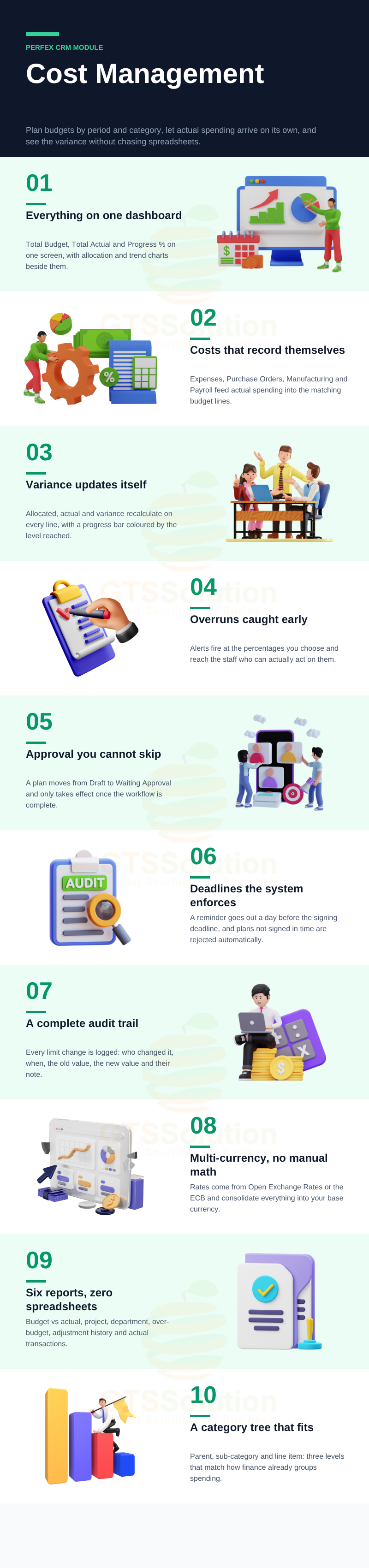
- One place for the whole budget. Total Budget, Total Actual and Progress % across the company, with allocation and trend charts on a single dashboard.
- Actual costs arrive by themselves. Four source modules feed real spending into the matching budget lines, so the comparison is always current.
- Overruns are caught early. Threshold alerts at 70%, 80%, 100%, 110% — or whatever levels you define — reach the people who can act on them.
- Approvals that cannot be skipped. Plans move from Draft to Waiting Approval and only take effect once the workflow completes.
- A complete audit trail. Every increase and decrease to a budget line is recorded with old value, new value, author, timestamp and notes.
- Six reports instead of six spreadsheets. Budget vs Actual, project detail, department detail, adjustment history, over-budget lines and actual transactions.
Module Features
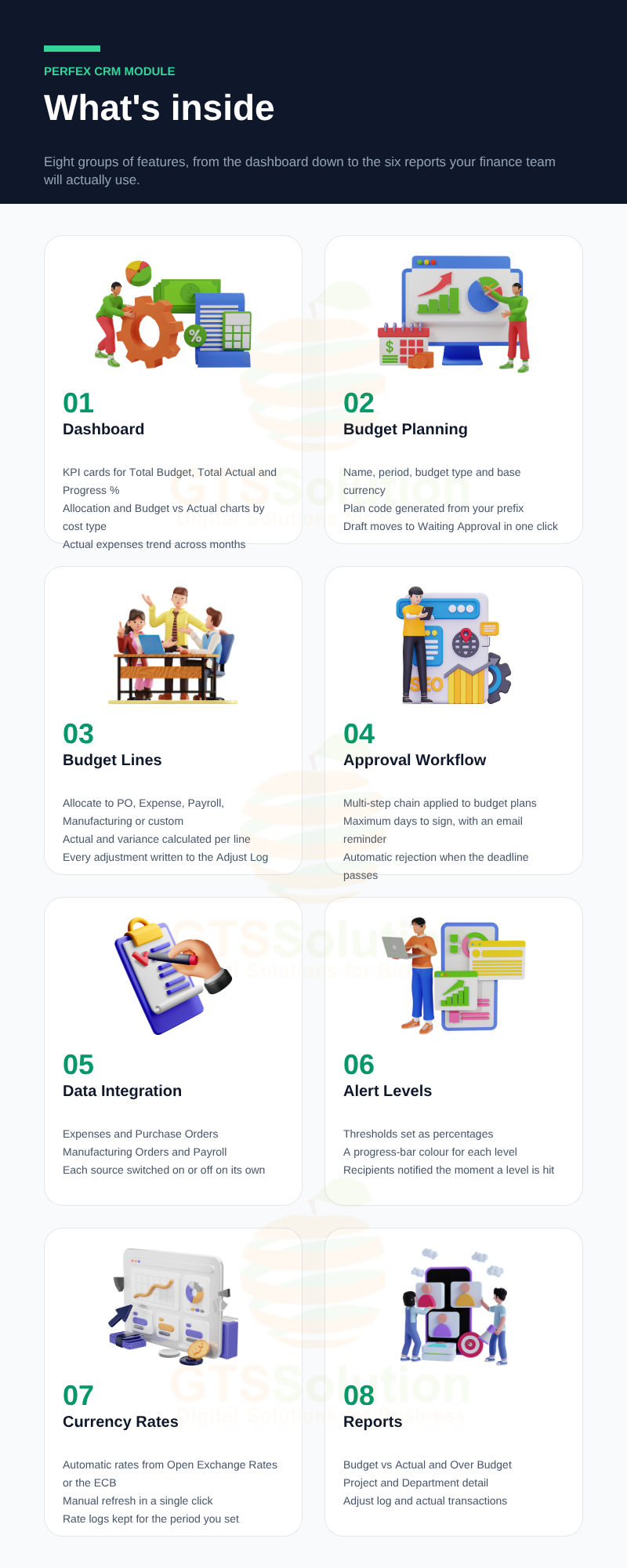
- Cost Management Dashboard — pick a budget plan and see KPI cards for Total Budget, Total Actual and Progress %, a budget allocation chart by cost type, a Budget vs Actual comparison chart, and an actual-expenses-over-time trend chart.
- Budget Planning — create plans with a name, period (start and end date), budget type and base currency. Identifiers are generated automatically from the prefix you configure.
- Budget Line Items — allocate amounts to integrated categories (Purchase Order, Expense, Payroll, Manufacturing) or to your own custom categories. The module calculates Actual Amount and Variance for each line and draws a progress bar coloured by the alert threshold it has reached.
- Budget Adjustment History — every limit change on a line is written to an Adjust Log: who adjusted it, when, limit type, old value, new value and notes.
- Send for Approval — submitting a plan moves it from Draft to Waiting Approval and starts the configured workflow.
- Multi-Step Approval Workflow — define the approval chain that applies to budget plans, with a maximum number of days to sign. A cron job emails a reminder one day before the deadline, and a plan that is not signed in time is rejected automatically.
- Flexible Approvers — either enforce a fixed sequential approver list, or let the person submitting the plan choose approvers at submission time.
- Cost Data Integration — switch automatic cost capture on or off per source module: Expenses for general company expenses, Purchase Orders for approved purchase value, Manufacturing Orders for material and production cost, and Payroll for staff salary cost.
- Budget Alert Levels — create alert levels as percentages, give each one a progress-bar colour, and register the staff who should be notified when actual spending reaches or passes that level.
- Automatic Exchange Rates — connect to Open Exchange Rates or the ECB to update rates automatically, or fetch the latest rates manually with one click.
- Currency Rate Logs — keep a history of rate movements, with a configurable retention period. A daily cron job at 16:00 purges expired entries; set the retention to 0 to keep everything.
- Budget Type — group plans into the budget families you actually use, such as Marketing, R&D, Operational or G&A.
- Budget Category Hierarchy — build a category tree up to three levels: parent category, sub-category and line item (for example Marketing → Digital Marketing → Google Ads).
- Budget vs Actual Report — allocated against actual by activity type, category and sub-category, with variance, variance rate and share of total budget.
- Project Budget Detail Report — total budget and actual spend per project, broken down by purchase order and expense, so you can judge each project’s financial performance.
- Department Budget Report — budget and actual by department, sourced from purchase orders and payroll, showing the remaining or over-budget amount and the variance rate.
- Over Budget Report — every budget line where actual spending has passed the allocated amount, in one list.
- Budget Adjust Log Report — the full history of budget limit adjustments across plans.
- Actual Transaction Report — every actual transaction (expense, purchase order, manufacturing, payroll) with amounts converted to your base currency.
Good to know before you buy
- The cost data integration options correspond to the source modules you have active. A source you do not run simply has no data to contribute.
- The budget category tree supports a maximum of three levels. A fourth level and below will not be displayed on the budget planning screen.
- Automatic exchange rates require a connection to Open Exchange Rates or the ECB.
- The approval deadline and the currency rate log cleanup both rely on the Perfex cron job running on your server.
Demo
Set-up
Included documentation will help you upload and activate the module inside Perfex CRM, if you are not aware on how to do it.
Support
Our support team is always around to help. Feel free to raise a support ticket.
Guys from support department will get back to you as soon as possible with a reply, guiding you through any issues.
Changelog
Version 1.0.0 / 2026-10-15
Initial version


