
Login to your account!
Join the World's Largest Web App Marketplace!
Great to see you here!
Let’s set up your account in just a couple of steps.
Forgot password?
Enter your username or email to reset your account.
Zapier for GoBiz vCard SaaS
By : NativeCode Published On Thursday, November 12, 2026, 07:48 In PHP Scripts


⚠️ IMPORTANT NOTICE: This is NOT a Standalone Script!
This product is an addon/plugin designed exclusively for GoBiz – vCard SaaS Digital Business Card Builder. You must purchase and install the main script first to use this Zapier addon.
What is the Zapier Addon for GoBiz?
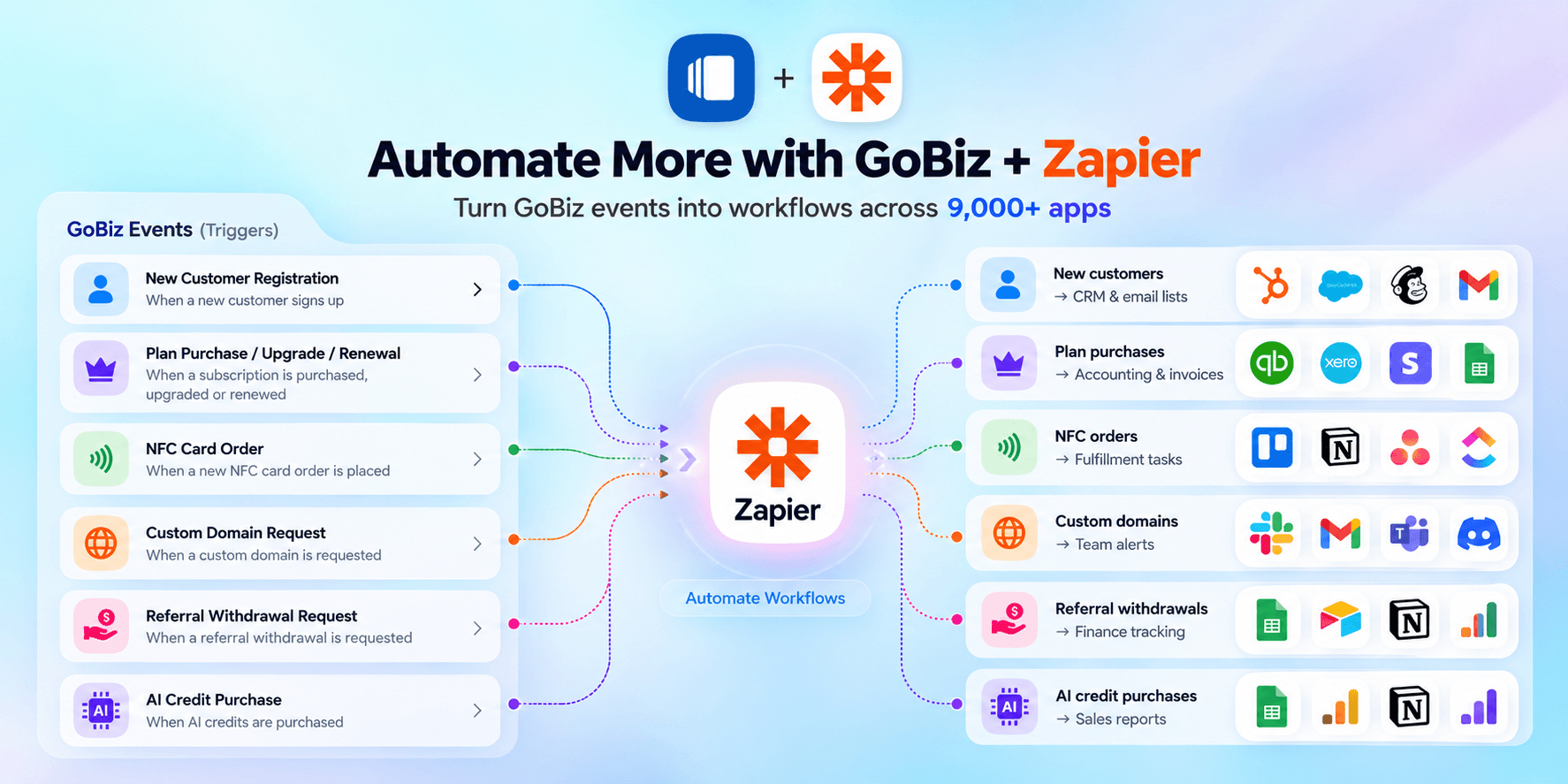
The Zapier Addon for GoBiz acts as a powerful automation bridge connecting your GoBiz vCard SaaS platform with over 9,000+ external web applications. Without writing a single line of code, this plugin turns your platform into an automated powerhouse by capturing real-time events on your site (such as customer signups, plan purchases, or NFC card orders) and instantly pushing that data to your preferred third-party tools.
How It Helps You as a Platform Owner
Managing a SaaS platform involves handling hundreds of daily activities—tracking customer payments, processing NFC orders, adding leads to email lists, and generating accounting invoices. Doing all of this manually is slow, stressful, and prone to human errors.
With this addon, your GoBiz platform works on autopilot 24/7:
- Instant Team Alerts: Receive immediate notifications on Telegram, WhatsApp, or Slack whenever someone buys a subscription or orders an NFC card.
- Automated Data Sync: New customer details and transactions are instantly recorded into Google Sheets, Airtable, or your internal CRM.
- Hands-Free Accounting: Automatically generate invoices and track revenue directly inside QuickBooks, Zoho Books, or Xero.
- Smooth NFC Order Fulfillment: Create fulfillment and shipping tasks automatically in Notion, Trello, or Asana without manually tracking order tickets.
Why Should You Buy This Addon?
- Save Hundreds of Hours: Eliminate repetitive manual data entry, CSV exports, and copy-pasting across different tools.
- No Custom Development Costs: Hiring developers to build custom API integrations for CRM, accounting, and messaging apps can cost thousands of dollars. This single addon connects you with 9,000+ apps out of the box.
- Zero Technical Effort: Simple plug-and-play setup. Map your fields and build custom workflows in minutes.
- Scale Your SaaS Faster: Spend less time managing operational headaches and more time marketing, acquiring customers, and growing your revenue.
Supported GoBiz Event Triggers
This addon provides rich dynamic variables for key platform events:
- New Customer Registration: Triggered instantly when a new customer registers (captures Name, Email, Phone, Address, Tax ID, etc.).
- Plan Purchases & Upgrades: Triggered on subscription purchase, upgrade, or renewal (captures Plan Name, Amount, Transaction ID, Payment Method, Status, etc.).
- NFC Card Orders: Triggered when an NFC card order is placed (captures Shipping Address, Order Total, Card Name, Quantity, etc.).
- Custom Domain Requests: Triggered when a tenant submits a custom domain request (captures Request ID, Current Domain, Status, etc.).
- Referral Withdrawals: Triggered when an affiliate requests a payout (captures Payout Amount, Bank/PayPal Details, Transfer Status, etc.).
- AI Credits Purchases: Triggered when a customer buys AI credits for digital card generation.
Connect with 9,000+ Apps Across Popular Categories
- Data Management & Spreadsheets: Google Sheets, Airtable, MySQL, PostgreSQL.
- Messaging & Notifications: Telegram, WhatsApp, Slack, Twilio SMS.
- CRM & Marketing: Mailchimp, ActiveCampaign, HubSpot, Salesforce.
- Accounting & Invoicing: QuickBooks, Zoho Books, Xero, FreshBooks.
- Task & Project Management: Trello, Asana, ClickUp, Notion, Monday.com.
Key Features
- Seamless integration between GoBiz and Zapier’s 9,000+ app ecosystem
- Comprehensive event triggers covering customers, subscriptions, orders, and payouts
- Extensive data variable mapping for flexible workflow design
- Multi-step Zap support (store in database, send an alert, and update CRM in one flow)
- Eliminates repetitive manual data entry and human error
- Ready-to-use plug-and-play addon architecture

Installation & Compatibility on vCard SaaS GoBiz
Compatible With: GoBiz v26.0.0 and later
Requirements:
- An active Zapier account
- Required Zapier integration access and configuration
- GoBiz installed (v26.0.0 and later) and running
Need help with setup? Check out the installation guide and configuration guide.
How to Configure on vCard SaaS GoBiz
Set up your Zapier Addon in a few steps:
- Log in to your Zapier account.
- Create a Zap and configure the required trigger and action.
- Access your GoBiz Admin Panel.
- Navigate to Plugins → Zapier and click on the Settings icon.
- Configure the integration settings according to the documentation.
- Enable the integration and test your workflow.
- Click Save to apply your settings.
Change log:
15-Oct-2026 – v1.1.0- Upgraded: Migrated from Blade to React for a more modern and responsive user interface.11-Oct-2026 – v1.0.1
- Initial release


