Login to your account!
Join the World's Largest Web App Marketplace!
Great to see you here!
Let’s set up your account in just a couple of steps.
Forgot password?
Enter your username or email to reset your account.
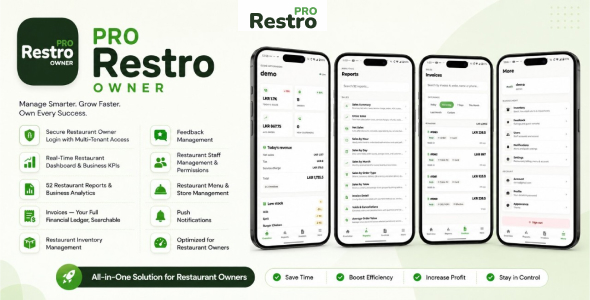
Manage Your Restaurant Business Anywhere with Restro Owner!
The Restro Owner App is a restaurant management, reporting, and analytics mobile application designed for restaurant owners and administrators using RestroPRO SaaS.
Monitor restaurant performance, track sales and orders, access detailed business reports, review invoices, monitor inventory, view customer feedback, and stay informed about restaurant operations directly from your mobile device.
With real-time synchronization and push notifications, Restro Owner gives restaurant owners convenient access to important business information without needing to stay at the main restaurant terminal.
IMPORTANT NOTE:
This is an ADD-ON mobile application. It is NOT a standalone product. You MUST separately purchase, install, and deploy the main product: RestroPRO SaaS POS Software
Restro Owner requires a compatible RestroPRO SaaS backend (v3.0.0 or compatible) for authentication, restaurant data, reporting, inventory, invoices, synchronization, notifications, and other core functionality.
The RestroPRO SaaS platform/backend source code, license, hosting, installation, and deployment are NOT included with the purchase of Restro Owner.
The “PRO” in RestroPRO is part of the product’s brand name and does not represent a paid upgrade tier over a free version.
Important: External Costs & Requirements
- Third-Party Services: The application may use third-party services such as Firebase, Expo/EAS, APNs, hosting providers, or other external services depending on your configuration. Some services may provide free usage tiers, but additional charges may apply if usage exceeds those limits or paid features are used. Any third-party service charges are the buyer’s responsibility and are NOT included in this purchase.
- Server Hosting (Required): Restro Owner depends on your separately deployed RestroPRO SaaS backend. Server hosting, domain, SSL, and other infrastructure costs are external and are NOT included with this purchase.
- Developer Account Fees (For Publishing): Publishing the application under your own brand may require an Apple App Store and/or Google Play developer account. Developer account fees are charged directly by Apple or Google and are NOT included in the purchase price.
- Push Notification Configuration: Push notifications require the buyer to configure the required Firebase/FCM and platform credentials. Notification delivery may depend on device permissions, operating-system settings, internet connectivity, and platform-specific restrictions.
RestroPRO Suite Integration
Restro Owner is designed to work within the RestroPRO ecosystem and requires the RestroPRO SaaS backend.
Other RestroPRO applications such as Restro Captain, Restro Kitchen, and Restro Waiter are separate products and are NOT included with the purchase of Restro Owner.
Certain cross-application workflows may require the corresponding RestroPRO application or functionality to be installed and configured separately.
Your Restaurant Business in Your Pocket
Restro Owner provides restaurant owners and administrators with a mobile-friendly interface for monitoring important restaurant operations and business performance.
From real-time sales and order information to restaurant reports, inventory, invoices, customer feedback, staff information, and restaurant configuration, owners can access important operational information directly from their mobile device.
Core Features:
- Real-Time Restaurant Dashboard: Monitor important restaurant performance information from a centralized mobile dashboard.
- Sales & Order Overview: Track today’s sales, order activity, average order value, revenue, and other important business indicators.
- Restaurant KPI Monitoring: Quickly review important restaurant metrics and operational information from your mobile device.
- Restaurant Reports & Analytics: Access a comprehensive collection of restaurant business reports covering sales, payments, menu performance, customers, operations, inventory, accounting, reservations, and feedback.
- Sales Reports: Analyze restaurant sales using detailed reports and available date-based reporting options.
- Payment Reports: Review payment-related business information and payment performance.
- Menu Performance Reports: Analyze item performance and understand which menu items contribute to restaurant sales.
- Customer Reports: Review customer-related business information and available customer analytics.
- Inventory Reports: Monitor inventory activity and stock-related information using dedicated reporting tools.
- Accounting Reports: Access supported accounting and financial reports directly from the Owner application.
- Report Export: Export supported restaurant reports using the export formats available in the application.
- Invoice Management: Search and review restaurant invoices and access detailed invoice information from your mobile device.
- Inventory Management: Monitor restaurant inventory, stock quantities, low-stock information, and inventory movements.
- Low-Stock Alerts: Quickly identify products that require inventory attention.
- Stock Movement Tracking: Review inventory movement information and stock activity from the Owner application.
- Customer Feedback: Review restaurant customer feedback and stay informed about the customer experience.
- Staff Overview: Review restaurant staff accounts, roles, account status, and assigned permissions.
- Menu Management: Access supported restaurant menu management functionality, including menu items and related restaurant configuration.
- Restaurant Configuration: Access supported settings for categories, taxes, payment types, tables, and other restaurant configuration available through the Owner application.
- Audit Logs: Review supported restaurant activity and audit information for better operational visibility.
- Real-Time Synchronization: Receive supported restaurant updates through real-time Socket.IO communication with the configured RestroPRO SaaS backend.
- Push Notifications: Receive supported Firebase/FCM notifications for important restaurant events and operational updates.
- Light & Dark Mode: Choose between System, Light, and Dark appearance modes for comfortable use in different environments.
- Phone & Tablet Support: Use Restro Owner across supported Android and iOS mobile devices and tablets.
Important Feature Clarifications
- Backend Dependency: Restro Owner requires an active and compatible RestroPRO SaaS backend. It cannot operate as a standalone restaurant management system.
- Staff Accounts: Staff account administration and permissions are controlled through RestroPRO SaaS. The Owner application provides access only to the staff functionality supported by the mobile application.
- Real-Time Features: Real-time functionality depends on the RestroPRO backend, Socket.IO configuration, server availability, and the device’s network connection.
- Push Notifications: Push notification functionality depends on correct Firebase/FCM or APNs configuration, device permissions, operating-system settings, and network availability.
- Printing: Printing requires a separately purchased and configured compatible printer. Printer hardware, installation, LAN/network setup, drivers, and other printer configuration are the buyer’s responsibility.
- Companion Applications: Restro Captain, Restro Kitchen, Restro Waiter, and other RestroPRO companion applications are separate products and are not included with Restro Owner.
Technology Stack:
- Framework: React Native / Expo (Cross-Platform iOS & Android)
- Real-Time Communication: Socket.IO
- Routing: Expo Router
- Local Storage: Expo SQLite / Secure Store
- Push Notifications: Firebase / FCM / APNs
- Backend: RestroPRO SaaS API
Try the Restro Owner Demo
Test the Demo App Before You Buy!
Download our demo APK and experience the Restro Owner dashboard,
reports, analytics, and restaurant management workflow before purchasing.
Demo Credentials:
- Email: [email protected]
- Password: demo
Need Help?
We offer Additional Services:
- App Reskinning & Branding: We can customize the app logo, splash screen, theme colors, package name, and other visual elements to match your restaurant brand.
- App Store & Play Store Deployment: We can assist with publishing the application through your own Apple App Store and Google Play developer accounts.
- Custom Feature Development: Need a specific restaurant management, reporting, inventory, or analytics feature? Contact us for a custom development quote.
- Installation & Setup: We can assist with configuring the application environment and connecting Restro Owner to your existing compatible RestroPRO SaaS installation.
Contact us at [email protected]